gatsby-metaphor-analysis — The Gatsby essay pipeline (12 Claude Code skills)
ttb-label-verification — The TTB label verification app
I saw Sam Corcos post about Treasury hiring AI engineers and applied.
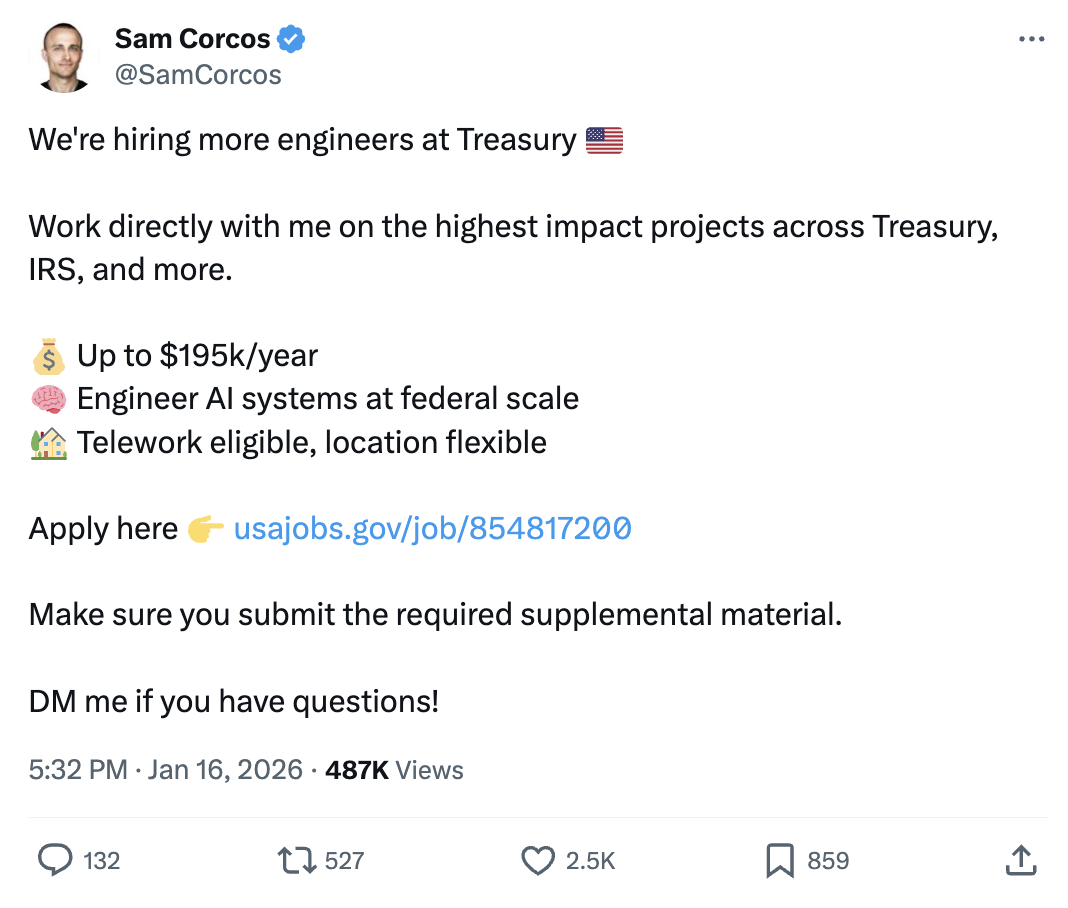
The comments were full of people dunking on the supplemental material requirement (a 10-page Gatsby analysis with translations). “This would take 5 mins with Grok.” “Just use ChatGPT.” They missed the point.
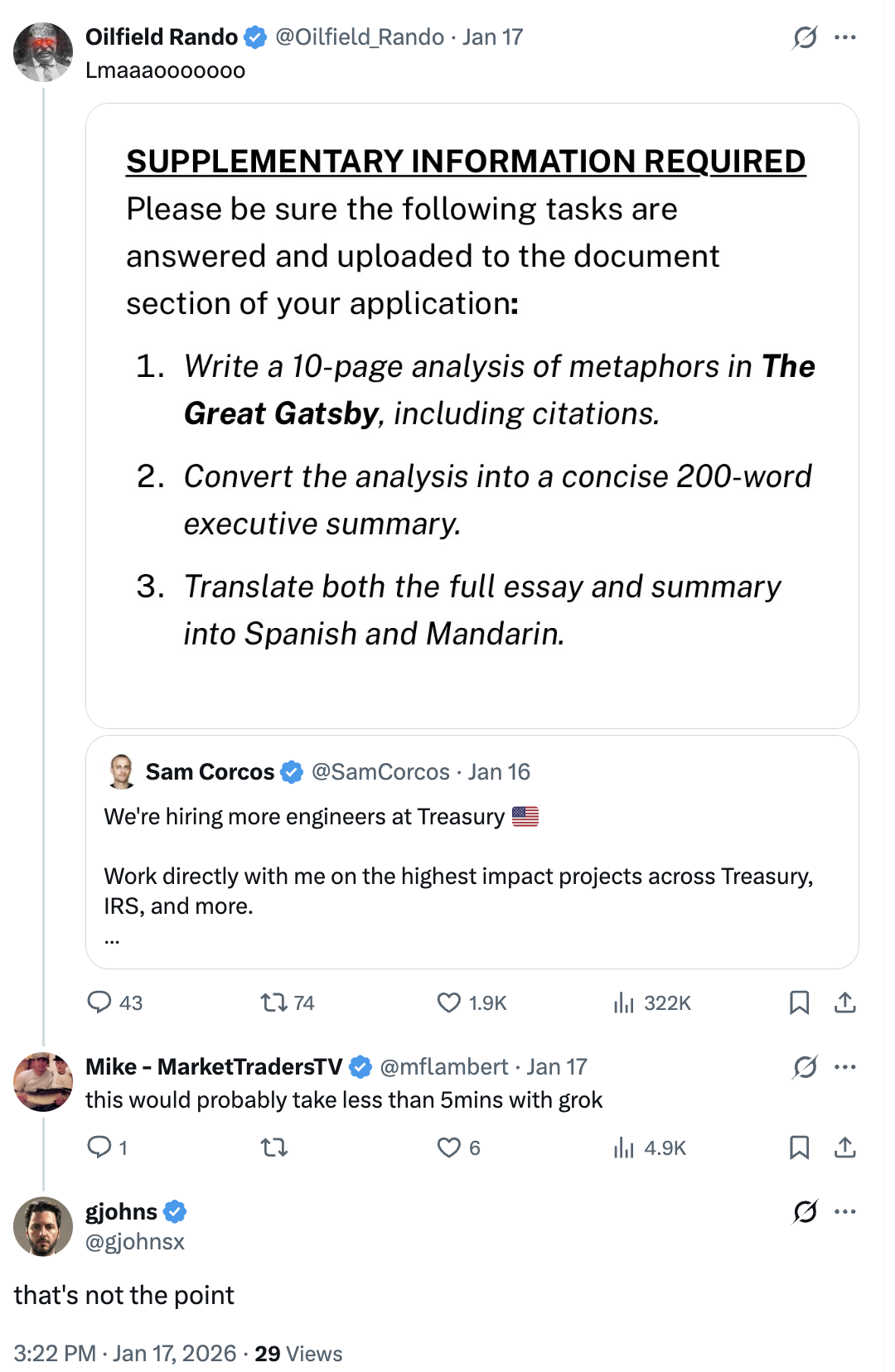
The requirement isn’t testing whether you can write a literary essay. It’s testing whether you can use AI tools effectively and verify the output. That’s literally the job.
The Gatsby Analysis
So I built it. Not by pasting the book into ChatGPT, but by building an orchestrated pipeline with Claude Code skills.
First, I asked ChatGPT 5.2 Pro what the most academically sound method for analyzing metaphors in literature is. After 16 minutes of reasoning, it recommended MIP/MIPVU (Metaphor Identification Procedure) combined with Conceptual Metaphor Theory. Now I had a defensible scholarly framework.
Then I built 12 custom Claude Code skills to execute a 7-phase analysis pipeline:
| Phase | Skill | What it does |
|---|---|---|
| 1 | /mip-research | Scholarly foundation, seed CMT systems |
| 2 | /mip-annotate | 9 parallel subagents annotate chapters concurrently |
| 3 | /mip-cluster | Cluster 100 metaphors into conceptual systems |
| 4 | /mip-outline | Essay structure with word budgets |
| 5 | /mip-draft | 3,422-word academic essay |
| 6 | /mip-verify | Verify all 35 quotes against source text |
| 7 | /mip-pdf | PDF-ready output |
Result: 100 metaphors identified, clustered into 4 systems (WEALTH IS PERFORMANCE, DESIRE IS LIGHT, MORAL DECAY IS PHYSICAL WASTE, TIME IS SPACE).
For translations, I built a 3-skill pipeline that extracts quotes, looks up their official published translations in Spanish and Chinese, then inserts them into the translated essay. Academic integrity requires using published translations, not AI-generated ones.
The whole thing is documented and reproducible. The skills pattern could adapt to other Treasury use cases like document analysis or compliance checking. That’s the point.
The Take-Home Project
The application also included a take-home project: build an AI-powered tool to help TTB compliance agents verify alcohol label applications faster.
Instead of jumping straight into code, I spent the first two days on research. That research shaped every design decision and helped me ship a working prototype with real data in 7 days.
The Assignment
TTB (Alcohol and Tobacco Tax and Trade Bureau) reviews about 150,000 label applications a year with 47 agents. The take-home included interview notes from four stakeholders describing their needs, frustrations, and past failures.
The key requirements buried in those interviews:
- Under 5 seconds per label (a previous vendor pilot failed because it took 30-40 seconds)
- Simple enough for agents with varying tech comfort (“something my mother could figure out”)
- Batch upload for high-volume reviewers who submit 200-300 labels at once
- Handle fuzzy matching (“STONE’S THROW” vs “Stone’s Throw” shouldn’t flag as an error)
- Exact matching for the government warning (word-for-word, all caps, legally required)
Day 1-2: Research Before Code
Federal Design Standards
I used ChatGPT Deep Research to investigate federal web design requirements. Found that USWDS (U.S. Web Design System) is mandated by the 21st Century IDEA Act, and Treasury has its own design system (TDDS) built on top of it. TTB specifically uses USWDS-based design.
Decision: Use shadcn/ui styled to match USWDS aesthetics.
Stakeholder Profiling
The interview notes included four people: Sarah (Deputy Director), Marcus (IT Admin), Dave (28-year veteran agent), and Jenny (8-month junior agent). I used Cursor to build psychological profiles of each one.
The key insight came from analyzing Dave:
Dave is an institutional skeptic with earned expertise. His 28 years mean he’s seen every modernization wave crash. The 2008 phone system failure isn’t trivia—it’s his proof that new ≠ better.
The Real Tell: “I’m not against new tools. If something can help me get through my queue faster, great.” This is permission. Dave will adopt technology that serves him. He won’t adopt technology that replaces him.
The conclusion: this tool succeeds only if Dave uses it. Jenny will adopt anything. Sarah will mandate nothing without proof. Marcus just needs it to not break things. But if Dave—the 28-year skeptic with informal influence—adopts it voluntarily, the whole team follows.
Design Principles
From the stakeholder analysis, I derived seven principles:
- Assistive, not autonomous — The tool suggests, agents decide. Never auto-reject.
- Speed as feature — Display processing time. Sub-5s must feel instant.
- Progressive disclosure — Different views for different users.
- Explicit confidence — Show confidence scores for every extracted field.
- Graceful degradation — Bad image? Don’t crash. Explain what’s wrong.
- Zero infrastructure burden — Standalone proof-of-concept, no COLA integration.
- Checklist mental model — Mirror how agents actually think about the work.
Day 3-5: Building the Core
I used Claude Code’s plan mode to work through the SPEC.md systematically. The Tasks tool was useful for breaking features into trackable steps.
Tech stack:
- Next.js 16.1 on Azure Static Web Apps (TTB is already on Azure)
- Prisma 7 + Azure SQL
- Azure Blob Storage for label images
- Two-stage OCR: Mistral OCR → GPT-4.1-nano via Azure AI Foundry
The two-stage pipeline was important. Mistral handles raw text extraction from label images. GPT-4.1-nano structures that text into typed fields with confidence scores. Splitting the work keeps processing around 5 seconds.
I chose Mistral OCR specifically because it’s open-source and self-hostable. For a federal agency dealing with sensitive data, being able to run the OCR model within their own infrastructure matters.
Day 5-6: The TDDS Registry (Parallel Work)
Before bed on Day 4, I kicked off a remote Claude Code session to build something that wasn’t in the requirements: a full shadcn component registry implementing Treasury’s design system.
The main app features were complete. Rather than context-switch, I delegated the registry work to an async agent running overnight in a git worktree.
Woke up to a working implementation. 35+ components with Treasury styling, dark mode support, installable via npx shadcn@latest add @tdds/button.
Why build this? Two reasons:
-
It demonstrates understanding of the federal ecosystem. TDDS exists but isn’t easy to use in modern React apps. Converting it to a shadcn registry makes it actually usable.
-
It shows I’m thinking beyond the immediate assignment. If this prototype informs future development, having a component library ready is genuinely useful.
The registry is live at tdds-registry.gregjohns.dev.
Day 7: Real Data
I replaced synthetic test data with real applications from TTB’s public COLA registry. Downloaded 24 application PDFs, extracted label images, uploaded them to Azure Blob Storage.
The demo now uses real government data end-to-end: real TTB IDs, real brand names, real label images.
What I Shipped
Live demo: icy-river-012b1601e.6.azurestaticapps.net
- Upload a CSV of label applications (batch support for 200-300 at once)
- AI extracts fields from label images with confidence scores
- Side-by-side comparison view: application data vs. extracted data
- Fuzzy matching for brand names, exact matching for government warnings
- Agent review workflow with audit trail
- Section 508 / WCAG 2.1 AA accessibility
How I Used AI Tools
ChatGPT Deep Research — Federal design standards, USWDS requirements, TTB-specific context.
Cursor — Stakeholder psychological profiles, design principles derivation.
Claude Code (local) — Plan mode for systematic implementation, Tasks for tracking progress.
Claude Code (remote/async) — TDDS registry as overnight parallel workstream. Git worktree for isolation.
Codex CLI — GPT-5.2 Codex on xhigh for code review, bug fixing, and second opinions. Used alongside Claude Code throughout the project.
Azure AI Foundry — Mistral OCR + GPT-4.1-nano for the extraction pipeline.
The key pattern: use AI for research and parallelization, not just code generation. The stakeholder profiles took 20 minutes and shaped the entire product direction. The overnight registry build would have taken me a full day manually.
Takeaways
Research compounds. Two days of research before coding meant I never second-guessed architectural decisions. Every choice traced back to a stakeholder need.
Async agents are underrated. Kicking off a Claude Code session before bed and waking up to working code is a legitimate workflow. Git worktrees make it safe.
Go beyond the assignment. The TDDS registry wasn’t required. But it showed I understand the ecosystem and think about reusability. That matters for a role focused on enterprise AI adoption.
Identify the skeptic. Every org has someone like Dave who’s seen modernization projects fail for 28 years. If you can build something that person actually wants to use, everyone else will follow.